
Race team management

One team.
Every car. Every driver.

Keep each chassis, driver’s feedback, tire, and component identifiable while the crew shares the information needed to prepare and run the cars.

01 / INDIVIDUAL TEAMS

A small team still needs
a complete record.

With one car and a small crew, the same person often handles setup, tires, and notes. RDT gives that team its own shared race record, with access for authorized members.

The benefit: less dependence on one person remembering the last setup, where a tire came from, or what the driver said after the run. A crew member can pick up the record and understand the starting point.
02 / MULTI-CAR TEAMS

Share the resources.
Keep each car distinct.

Cars within a team can share crew and parts inventory, but each physical chassis needs its own geometry, installed configuration, setup history, and race records. Driver-specific track tire inventories retain their own eligibility requirements.

The benefit: measurements and setup notes remain tied to the correct car, even when two cars have the same number or use similar parts. Review another car’s experience with the chassis and session context intact.

03 / MULTI-DRIVER TEAMS

Give every driver’s
feedback its context.

When drivers share a car or rotate among cars, keep each driver’s track tire inventory distinct. Identify the driver for the run and retain the car, tire readings, conditions, feedback, and lap times together.

The benefit: the team can review who drove, what they felt, and what equipment they used. A comment from one driver does not lose its identity among another driver’s sessions.

Driver track tire inventory / notes / life cycles

Know which tires your driver can run.
Learn more from every lap.

At tracks that assign a registered tire inventory to each driver, having the right compound is only part of the job. The tire fitted to the car must also belong to that driver’s eligible track inventory. Running a tire outside that inventory can mean disqualification.

Keep the driver’s track tire inventory identifiable, then use each tire’s record to retain its measurements, usage, condition, and performance notes. The crew gets a practical reference for choosing an eligible tire and understanding what it has left to offer.

The driver’s eligible track inventory

  • Identify the driver, track, division, and tires assigned to that driver’s track inventory.
  • Check the physical tire IDs on the car against the driver’s eligible list before the session.
  • Keep driver-specific tire eligibility distinct even when cars, crew, and other parts are shared.

The individual tire’s history

  • Tire ID or barcode, brand, compound, and size measurements.
  • Laps, heat cycles, pressures, temperatures, and recorded condition.
  • Car, corner, session, and driver feedback that explain how the tire was used.
A multi-driver team

A tire can be in the team’s trailer and still be outside the next driver’s registered track inventory. Before that driver heads out, check every fitted tire’s ID against their eligible inventory. A shared car or matching compound does not establish eligibility.

Track inventory and credit rules depend on the track and division. Use the track’s official inventory and current rules to confirm eligibility; a record in RDT is not an official approval.

Great notes without rebuilding the story.

Save readings and brief observations with the individual tire and the relevant run. Record what the driver felt, when the behavior appeared, and the conditions at the time. Keeping those details together makes the next review easier than reconstructing a tire’s history from scattered notes.

Useful notes can be short: corner used, laps this run, cold and hot pressure, size change, visible condition, and feedback at entry, middle, or exit. Record the observations you have; retain the context that makes them meaningful.

Learn a new division tire sooner.

When a division changes to a new tire, start a history for that tire specification. Keep pressures, temperatures, sizes, laps, heat cycles, conditions, and driver feedback together from the first outings.

Review how the recorded behavior changes across runs. That helps the team build its own reference for the new tire’s characteristics, rather than assuming the previous tire’s notes apply. Distinguish tire behavior from setup, driver, and track-condition changes.

Life cycles when tire credits are limited

The LF tire can become the long-term commitment.

With limited tire credits, teams may keep the left-front tire in service much longer to preserve credits for other replacements. Its record needs to span race weekends: total laps, heat cycles, size measurements, condition, and changes in feedback.

That history helps the crew plan where to use the next available credit and recognize when the long-serving LF needs closer review. A tire still being in the driver’s eligible inventory does not describe its remaining life or performance.

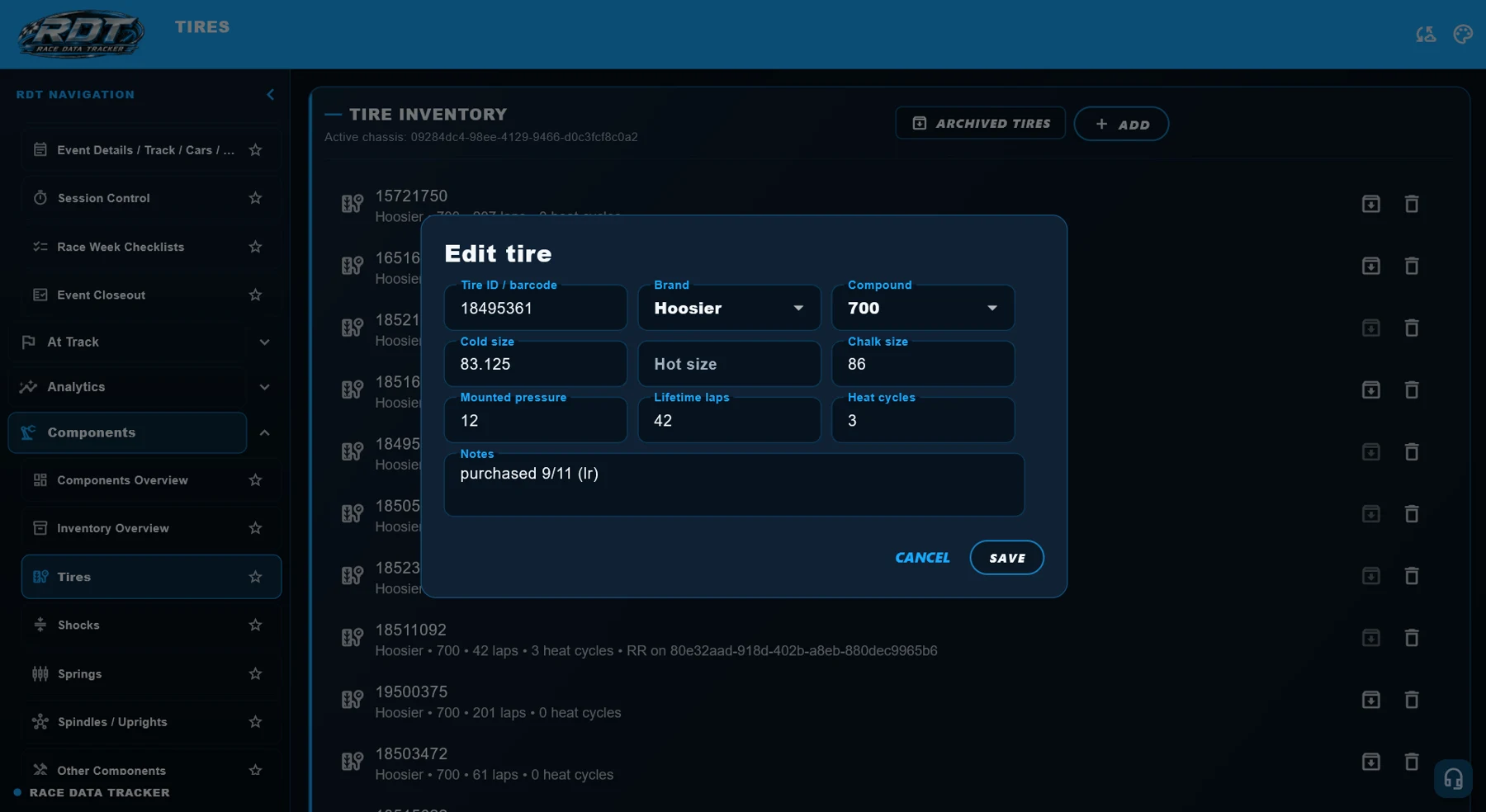
RDT individual tire record with tire ID, sizes, pressure, lifetime laps, heat cycles, and notes
Individual tire record · RDT Windows reference screen, September 2026
Prepare the driver’s starting tires
Shared parts / individual records

One team inventory.
A record for each part.

Sharing parts inventory should not turn every spring or shock into an anonymous quantity. Keep individual entries for the equipment the team uses, then record the installed components against the appropriate car and corner.

What the crew shares

  • The team’s component inventory and the information recorded for those items.
  • A common reference when preparing cars and selecting parts.
  • Installed configuration records that identify what is on each chassis.

What stays individual

  • The identifying details and specifications recorded for each component.
  • Component-specific measurements, specifications, and notes.
  • The car and corner record for the part selected in that configuration.
At the shop

Two cars use shocks with the same specification. Record them as distinct inventory items and select the actual shock installed on each car. The crew can review the inventory and the car’s setup together instead of treating matching specifications as proof that the parts are interchangeable in the record.

This helps the team avoid selecting the wrong item, losing track of component details, or confusing a shared spare with the component recorded on another car. Individual entries keep the detail; the shared inventory gives the crew a common reference.

Prepare installed components
Data privacy & authorized access

Your race knowledge is valuable.
Control who can access it.

Chassis measurements, setup history, tire notes, and driver feedback are part of your team’s knowledge. RDT uses individual accounts and team permissions to control access to that information. Sharing within your team does not make your race records public to other teams.

Limit access to different parts of the app.

Team owners and authorized administrators can limit which app sections a member is authorized to access. Give each person the access needed for their work while keeping other sections restricted.

For example, a crew member responsible for tires can be given access for tire work while access to geometry or other sections is restricted. Membership in the team does not need to mean access to every part of the app.

Use an individual login for every member.

Each team member should sign in with their own account. Individual accounts let the team assign access to the right person and manage that person’s membership as responsibilities change.

Keep credentials private. Team collaboration works through authorized access to shared records, rather than a password passed around the crew.

Why it helps

The tire crew, setup specialist, and team manager may need different information. Section-level access lets the team share the tools people need while protecting access to other team records. Your plan determines available features; each member’s permissions determine what they can access.

Read the Privacy Policy
Team plans / individual accounts

A plan for your team and cars.
A login for every member.

Your RDT plan covers the team and its cars according to the selected plan’s active-car limit and included features. Billing is based on the team plan and car coverage, not a separate subscription for each member’s login.

One team subscription.

The team owner manages the subscription. Authorized members use the team’s entitled features through their own accounts, within the access granted to them. Adding a member’s login does not require buying another copy of the team’s plan for that person.

Individual logins, individual permissions.

Every team member should have their own login—even in a one-car team. Personal accounts provide access to the same authorized team record while allowing different access to app sections.

A two-car team with a crew

Select a plan that covers the team’s active cars and required features. Invite the crew using their own accounts, then assign the app access each person needs. The team’s car coverage and plan determine its subscription, rather than multiplying that subscription by the number of people signing in.

One race-week workflow

Work together with the right access.

Identify the chassis and driver, establish the installed setup, check tires against the driver’s track inventory, and record readings and feedback. Each member contributes through their own account and the sections they are authorized to access.

Save entries and check synchronization before relying on another device’s view. Active-car limits and feature availability depend on your selected plan, platform, and app version.

Learn the team workflow