
- Step 1
Select the car and race week.
In Garage Context, check the Car / Chassis and Race Week / History selections. Confirm the track and division before editing or carrying a setup forward.
Before moving on: The car, event, and driver match the work being performed. - Step 2
Establish the starting setup.
At Start of a Race Week, carry forward the previous setup or establish a new setup. Carry forward creates the starting state; at-track adjustments remain session-specific.
Before moving on: The previous setup is a deliberate starting choice, not an assumption that nothing has changed on the car. - Step 3
Check what is installed.
Review each corner against the physical car: spring, shock, tire, and recorded settings. Select the actual individual inventory item, even when the team has several parts with matching specifications. Keep each car’s installed configuration distinct from the shared inventory.
Before moving on: The selected parts and corner locations match the installed configuration. - Step 4
Check eligibility and establish the starting tires.
Confirm the driver, track, and division. Where driver-specific track inventories apply, check every fitted tire ID against that driver’s official eligible list. Then establish the starting tires and review sizes, pressures, laps, heat cycles, condition, and notes. Pay attention to long-serving tires such as an LF retained under limited tire credits.
Before moving on: The fitted tires are checked against the driver’s eligible inventory, and the recorded starting set matches the car. - Step 5
Review and save the setup sheet.
Open the setup sheet and review the available fields: springs, shocks, camber, caster, toe, frame heights, corner weights, stagger, pinion angle, and sway-bar preload. Give the setup a useful name and save it.
Before moving on: Values were measured or confirmed, and the saved sheet belongs to the intended chassis and race week. - Step 6
Move into the race session.
With the starting configuration established, use At Track for the session and run record. Keep later changes attached to the run where they were made.
Before moving on: The crew can tell the starting configuration from subsequent event changes.
Tech Center / Garage
Garage: prepare a repeatable starting setup.
Garage keeps the baseline and installed configuration with the chassis. Check the actual car before carrying settings into a new race week.
App reference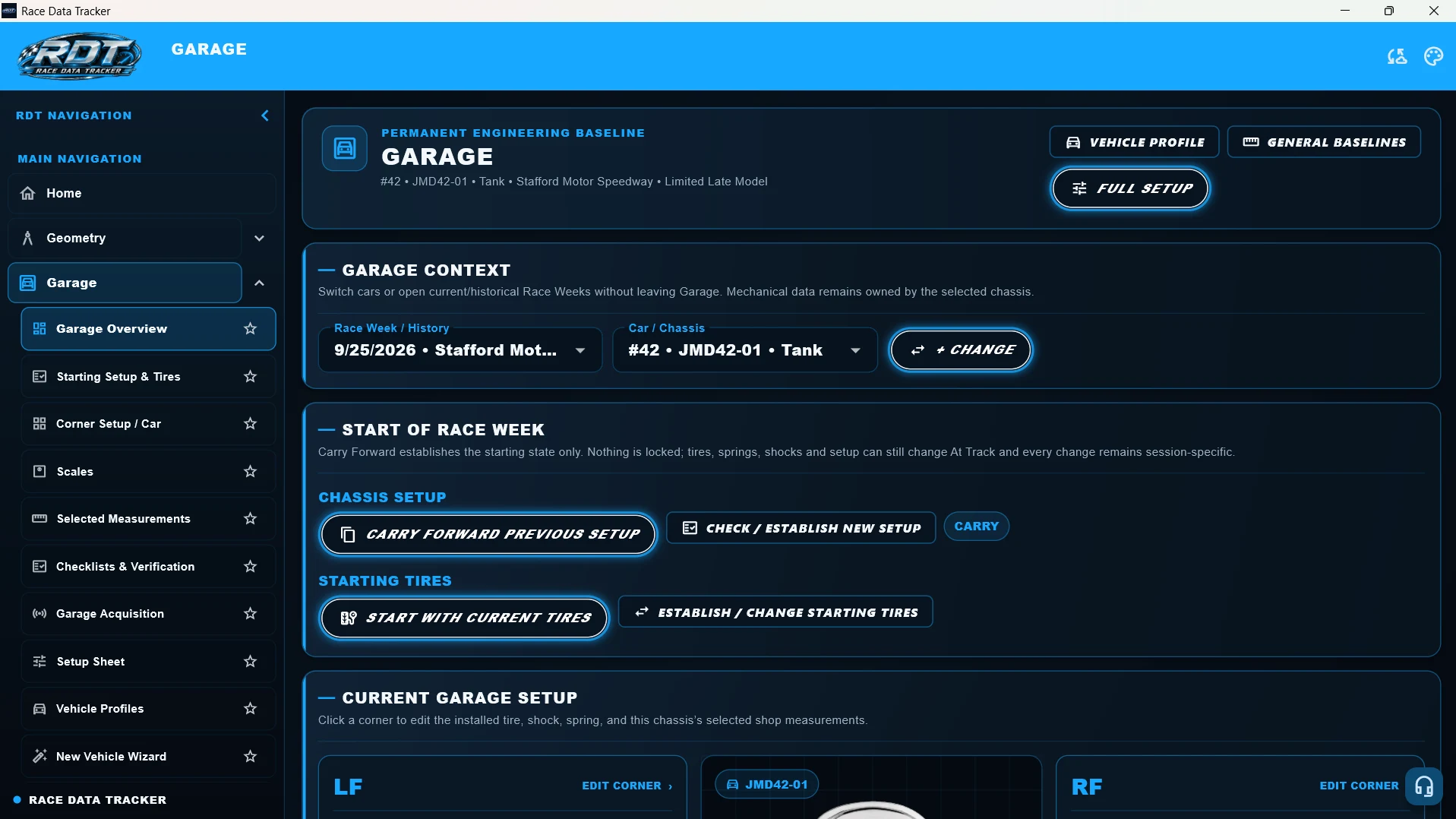
Worked workflow
Before returning to the same track, select the chassis and previous race week. Review and carry forward the desired setup, confirm any spring or shock replacements, establish the starting tire set, and save the setup before recording the first session.
Common mistakes to avoid
- Selecting a car by number without checking the physical chassis.
- Carrying a setup forward without checking replaced components or changed settings.
- Assuming a tire in the team’s stock is eligible for every driver; check the driver’s track inventory.
- Recording the wrong tire because two tires share the same compound or appearance.
- Editing the baseline when the intention was to record a change in one track session.